Pruning 45k-Token Accessibility Trees for Single-RTT Device Control
Anyone who has used a GUI agent on a phone or desktop knows the frustration. Ask it to search for a video or send a message, and its actions stutter: it taps a button, freezes for seconds, and once the tap finishes, it pauses again to re-inspect the screen as if unsure of what just happened. It hesitates, sometimes tapping stale coordinates from the previous screen. When transition animations lag or a canvas-rendered page appears, it idles in place. Watching it makes you want to reach out and take over the screen yourself.
Most people blame the model's inference speed. But profiling the pipeline on a real device reveals that raw token generation time is only part of the problem. Three lower-level engineering bottlenecks make GUI agents feel sluggish: input overload from unpruned accessibility dumps, fragmented timing from bouncing between perception and execution over multiple network round trips, and state ambiguity caused by inspecting the viewport while transition animations are still in flight.
While developing the phone-use module in Zafiro, I redesigned the architecture around signal-to-noise ratio, timing determinism, tool contracts, and external agent orchestration.
Reshaping view tree signal-to-noise ratio
To operate a phone, an agent must first perceive the screen. Android Accessibility offers the lowest-overhead introspection channel, but raw dumps are pure noise to language models.
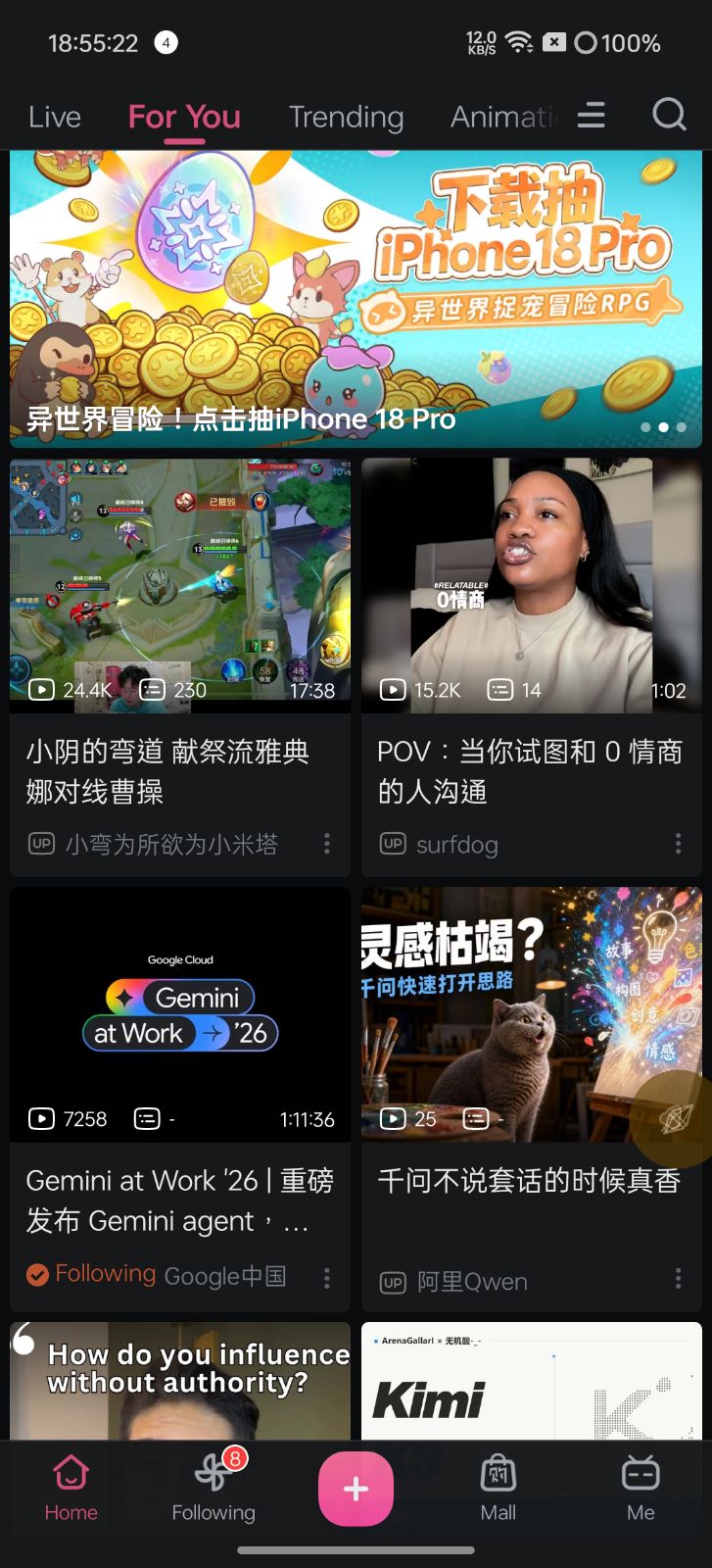
On a dual-column feed screen like Bilibili's home feed, the raw accessibility dump exports a 253 KB indented JSON payload across 165 nodes, consuming over 45,000 tokens in a single frame. Only 61 nodes carry text, click listeners, or semantic descriptions. The remaining 104 are nested layout containers without semantic value.
In Zafiro, I replaced verbose JSON and XML with a compact pseudo-YAML format. Payload size dropped by nearly 90%, bringing single-frame consumption down to roughly 1,800 tokens.
Pruning follows four rules: flattening intermediate container shells, omitting false boolean attributes, assigning 3x3 grid spatial anchors (pos: top-left, pos: center), and appending dynamic summaries (more: [...]) for scrolled-off items so the agent knows the list continues downward without wasting tokens on off-screen views.
In commit 5b72d401, I hoisted the snapshot version token from individual nodes into a global tree header (version: "83ba8f6a7a2b"), leaving nodes with plain integer indices (i: 42). In tool schemas, the model concatenates {version}_{i} when dispatching actions. String concatenation costs the model near-zero compute during generation, while saving 13 characters per node on device output.
<!-- Raw Android hierarchy dump (unpruned) -->
<hierarchy rotation="0">
  <node class="android.widget.FrameLayout" bounds="[0,0][1080,2376]">
    <node class="android.widget.LinearLayout" bounds="[0,0][1080,2328]">
      <node class="android.widget.FrameLayout" bounds="[0,0][1080,2328]">
        <node resource-id="tv.danmaku.bili:id/action_bar_root" class="android.widget.FrameLayout">
          <node resource-id="android:id/content" class="android.widget.FrameLayout">
            <node resource-id="tv.danmaku.bili:id/drawer" class="android.widget.FrameLayout">
              <!-- Six nested layers of zero-margin, non-clickable, empty layout containers -->
              <node class="android.widget.TextView" text="Search for Videos, UPloaders" ... />
screen: [1080, 2208]
app: tv.danmaku.bili
version: "b7a17e75ac4c"
tree:
- {i: 0, t: container, b: [0,0,1080,2376], pos: center, ch: [
- {i: 1, t: list, b: [0,0,1080,2328], pos: center, scroll: true, ch: [
- {i: 2, t: list_item, b: [30,0,171,96], pos: top-left, h: "Profile, button", tap: true}
- {i: 3, t: list_item, b: [213,0,768,87], pos: top, h: "Search bar, button", tap: true, ch: [
- {i: 4, t: text, b: [310,6,738,65], pos: top, txt: "Search for Videos, UPloaders"}]}
- {i: 37, t: list_item, b: [15,694,532,1329], pos: left, h: "Vertical card, creator...", tap: true, hold: true, ch: [
- {i: 41, t: text, b: [39,1108,508,1226], pos: left, txt: "Athena sacrificial strat vs Cao Cao"}
- {i: 42, t: text, b: [99,1253,423,1302], pos: left, txt: "Creator channel", tap: true}
- {i: 43, t: container, b: [442,1236,532,1326], pos: center, h: More, tap: true}]}
...
], more: ["Next video card...", "Recommendation item..."]}Operational protocols as dynamic skills
Clean view trees alone do not prevent operational failures. Foundation models exhibit blind spots with mobile interaction patterns: when to inspect the screen, when to rely on coordinates, where to anchor swipe gestures, and how to recover from runtime errors.
Standard frameworks cram entire operating manuals into the static system prompt. But mobile SOPs span thousands of words covering gesture physics, coordinate scaling, and keycodes. If pinned in the system prompt, even a simple weather question pays thousands of tokens for static instructions every turn. Zafiro uses dynamic skill loading: the system prompt keeps a minimal index, loading the phone-use skill via load_skill only when touching the interface.
For gestures, Android accessibility scroll implementations vary unpredictably across apps, so list scrolling defaults to physical Shell swipe injections. Swipes must anchor at 70% down the scroll container, avoiding bottom edges where persistent navigation bars or floating players intercept touch events. If two consecutive swipes produce identical screens without loading spinners, the agent treats the list as bottomed out and stops.
Models often suffer from memory drift in long sessions, trying to click an index from turn three after navigating to a different screen. Zafiro guards against this with version tokens: each screen dump generates a random hash that must accompany subsequent tool calls. If the token expires, the runtime rejects the action.
Instead of a bare error code, the tool returns an actionable prompt: "Token version mismatch, viewport updated. Call screen_operation_accessibility to fetch the latest tree." The model reads this feedback and re-inspects the screen on the next turn without human intervention.
Halving round trips with atomic perception loops
In traditional agent architectures, perception and execution run as separate tools. A single tap requires three round trips between cloud and device: inspect screen, dispatch tap, and inspect the updated screen. Three round trips and two prefill delays stretch simple interactions into dozens of seconds.
Zafiro collapses write operations and perception into an atomic loop. Every write tool (tap, swipe) executes and immediately returns the post-action pseudo-YAML tree within the same response. The model sees the new screen state instantly, cutting network round trips in half.
Grabbing the tree immediately after a tap captures transition artifacts or half-opened keyboards, while a hardcoded two-second sleep makes interaction sluggish even when screens settle in 200 ms. In AccessibilityController.kt, waitForStable enforces dual convergence: a 200 ms floor for animation dispatch, 50 ms structural hash polling, and at least 300 ms of accessibility event idle before capturing the settled tree.
Dual-modal fallback for self-drawn canvases
Mobile ecosystems rely heavily on custom rendering engines. On Flutter apps, unannotated React Native screens, or WebViews, Android accessibility dumps collapse into a single blank container node, leaving semantic trees completely blind.
When encountering Flutter apps, unannotated React Native screens, or WebViews, Zafiro falls back cleanly: detect the empty root container, capture a screenshot for multimodal vision analysis, and dispatch absolute pixel taps via screen_operation_shell.
To minimize bandwidth and token consumption, screenshots are downsampled. The tool schema explicitly returns both physical display and image dimensions, requiring the model to scale coordinates proportionally: screen coordinates derive from image coordinates scaled by display-to-image axis ratios.
Exposing physical hardware as an MCP server
Testing mobile agent tools used to be a frustrating cycle: write code on the laptop, build and install the APK onto the phone, type a test prompt into the on-device agent, wait for it to run, take manual screenshots, and copy logcat back to the laptop to inspect failures. When an execution crashed, I ended up as a human courier shuttling screenshots and error logs between the phone agent and my desktop coding agent.
Wrapping the phone into an MCP server changed that workflow. By embedding a lightweight Ktor CIO service inside Zafiro via McpServiceImpl.kt, we exposed accessibility actions, shell events, screenshot capture, and package management over the Model Context Protocol.
A desktop coding agent connects over LAN or adb forward tcp:8791 tcp:8791, invoking on-device tools as if calling local functions. During the terminal persistence refactor in PR #302, an external coding agent drove test suites through MCP, captured screenshots for verification, and fixed regressions directly from logcat without me acting as a middleman.
On-device vision models and the next horizon
Making an AI operate graphical interfaces smoothly is never just about tuning prompts. Unpruned view hierarchies blow context budgets, decoupled loops multiply network round-trip delays, and missing convergence checks trap agents in transitional animations.
Current solutions remain deliberate engineering compromises. Custom rendering engines like Flutter, unannotated React Native, and WebViews still force fallbacks to bandwidth-heavy multimodal screenshots.
As mobile hardware improves, the next step is straightforward: running a small 0.5B to 1B vision model locally on mobile NPUs, or using decision models like Jev as a sub-brain. Inferring a normalized semantic tree directly from screen pixels at sub-100ms latency bridges native views, Flutter, and Web canvases without cloud token overhead.
When that happens, agents will navigate any screen regardless of the rendering engine underneath, with minimal latency and near-zero token costs. Until then, writing practical pruning rules, trimming unnecessary characters, and enforcing reliable timing convergence remain the most dependable foundation for on-device agents.